How Lead Recovery Works
Short version: a lead comes in after hours, Lead-Pulse texts your phone. You call back before the homeowner calls the next roofer. This page walks through a real example from start to finish.
We'll follow Summit Roofing — a fictional Houston company — through one Thursday night storm. Same story in all three sections.
1. When a lead comes in
"What does Lead-Pulse actually do?"
It's 8:47 PM on a Thursday. A storm just moved through Houston. Summit Roofing's office closed two hours ago and the owner, Jordan, is finishing dinner. A homeowner named Casey lands on Summit's website and fills out the contact form:
"Water coming through kitchen ceiling after tonight's storm. Active leak right now."
Here is what happens in the next two minutes.
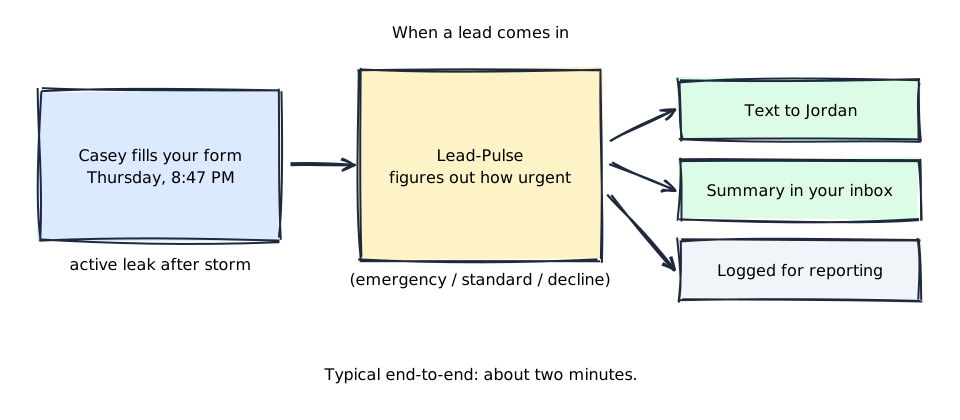
- Casey's form submission is handed off to Lead-Pulse as soon as they hit submit. You don't have to change the form — we wire it up during setup.
- Lead-Pulse reads the submission and decides how urgent it is. "Active leak" and "water coming through ceiling" are emergency phrases Summit chose during onboarding. This lead is tagged emergency.
- Jordan's phone buzzes with a text carrying Casey's callback number, the address, and a one-line summary. At the same time, a clean summary email lands in Summit's office inbox, and the lead is logged for Monday's weekly report.
Jordan calls Casey back within the hour and books first thing Friday morning. Without Lead-Pulse, Casey would've called the next roofer.
About phone answering
Phone answering is coming soon. At launch, Lead-Pulse covers web-form leads — the thing most roofers are losing overnight and on weekends. When we take on a customer with a phone-answering contract we'll turn that layer on; until then phone is not available so nothing quietly fails on your end.
2. Getting set up
"What do I have to do to install this?"
Scene 1 showed Thursday at 8:47 PM. This is the four days before that — how Summit got ready so Casey's leak hit Jordan's phone in under a minute.
You don't install software yourself. We do the wiring with you during onboarding. That's the product.
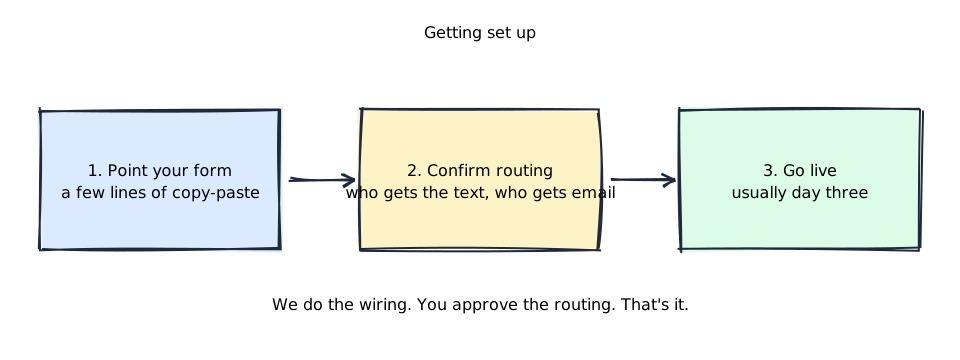
- You fill out the onboarding form. We need company name, service-area zips, your emergency phrases (the words that mean "drop what you're doing"), who gets texts, who gets email, and your CRM (if you have one).
- We confirm routing with you — one short call or email thread. You approve the text recipients, the email recipients, and the emergency phrases. Nothing goes live until you sign off.
- Go live — usually day three. From that moment, real homeowner submissions route through Lead-Pulse. This is how Casey's 8:47 PM leak inquiry reached Jordan in Scene 1.
Everything technical — the integration with your form, signing keys, sandbox testing — is handled by us. You approve the routing; we do the plumbing.
3. What a week looks like
"After go-live, what do I experience?"
Lead-Pulse runs in the background. Most days you won't think about it. Here's what a normal week looks like for Summit after go-live.
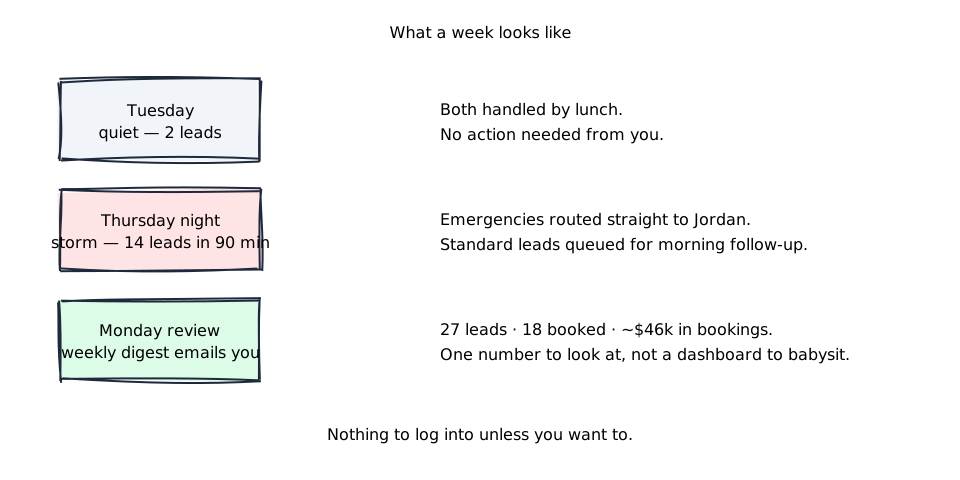
Tuesday — quiet
Two web leads come in during the day. Both get qualified, routed to the office email, and handled by lunch. You don't hear from Lead-Pulse because you don't need to.
Thursday night — storm spike
Fourteen leads arrive in ninety minutes. Four of them are tagged emergency (active leaks, ceiling water, emergency tarp requests) and those buzz Jordan's phone immediately. The other ten are queued up in the office email for Friday morning follow-up, already sorted by zip code and urgency.
Monday — the weekly digest
An email lands Monday morning with last week's numbers: leads recovered, emergencies escalated, how fast each one was responded to, jobs booked, and an estimate of revenue attributable to the platform. One email. No dashboard to babysit.
What you experience on Friday morning
Jordan wakes up, reads the overnight text thread with Casey (booked), skims the office inbox for the rest, confirms nothing slipped. No login, no dashboard check, no "did it work last night?" anxiety.
What's not included at launch
We're honest about this because surprises after a signed contract are the worst kind of surprise. The following are intentionally not included at first-customer launch — each has a named condition that will turn it on.
- No customer login. We operate the system on your behalf. If you want your own login later, we'll build it when that moment comes.
- No self-serve billing. Invoices are manual. Self-serve billing shows up when we have more than a handful of customers.
- No phone answering. Web leads only at launch — the channel most roofers are bleeding. Phone answering is coming soon.
- No published traffic ceiling. We haven't load-tested for extreme volumes. If you expect more than 500 leads a day, tell us during onboarding so we can plan for it.
More detail
- Got technical questions? How the form talks to Lead-Pulse, what security looks like, what happens when something fails — see the technical walkthrough. Same narrative, every detail filled in.
- For the operator's view (go-live checklist, ops runbooks, internal reference) see the launch-scope ledger in the main README.